When a 4K display has to be mounted 80 meters away on the far wall of a control room, but the host PC can only live in the server rack, the problem is far bigger than "run an HDMI cable." A 4K@60Hz 4:4:4 video signal has a very high bitrate — a standard HDMI cable starts to show signal attenuation past roughly 15 meters. And the moment you also need to "operate that host from a keyboard and mouse at the far end," things get more complicated.
This is exactly the scenario an optical-network KVM fiber extender solves. It is not a vendor gimmick; it is a mature signal-transmission pattern used across professional AV, control rooms, and medical teaching. Below we break down how it works, what the key specs mean, and how to select one.
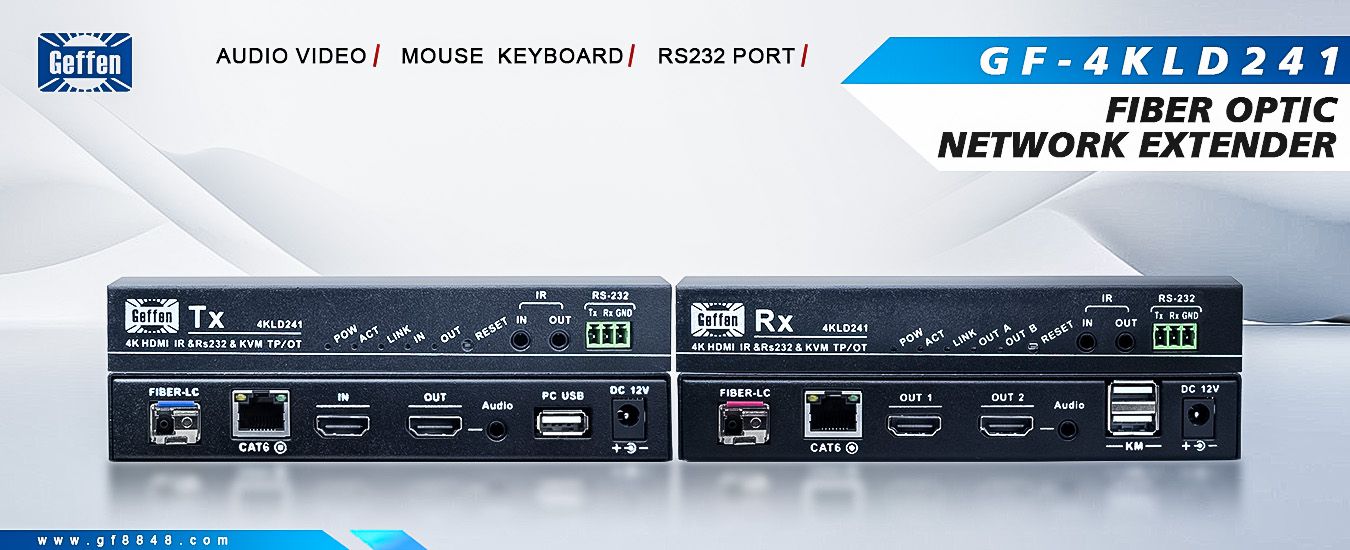
Combine those three and you get what engineers call a KVM fiber extender: video, audio, serial, IR, and keyboard/mouse — all carried over one cable (or one fiber).
The video signal supports up to 4K@60Hz 4:4:4 — the full-fat spec for true 4K high refresh, essential wherever color precision matters, such as medical imaging and broadcast-grade production. Even more practical is EDID pass-through: when the TX HDMI loop-out and the RX HDMI output feed different displays simultaneously, the unit automatically takes the "intersection" of each display's EDID, guaranteeing every screen outputs correctly — no more "plug it in and it goes black / drops resolution."
In real cabling, 100 meters is the sweet spot for Cat6. This approach runs the full 100m over Cat6 and supports PoC (Power over Cable) — a single DC12V supply at the transmitter powers the receiver through the cable, so the far end needs no nearby outlet. Fiber mode is optional, used to break past 100m or to run through electrically hostile environments.
TX connects to the host, RX to the keyboard/mouse, letting you operate the host across dozens of meters. For seat management and centralized server-room operations this is a must-have: staff stay out of the hot, noisy rack and do everything from a local screen and keyboard.
Bidirectional RS232 transparently carries control commands (e.g., linking lighting or cameras); bidirectional IR can learn and forward infrared remotes, sending a far-end device's remote signal back to the rack. CEC is typically dropped in this class of gear — designed for consumer appliance linking, it tends to become an interference source on a professional site, so disabling it is more stable.
Dual HDMI outputs are friendly to "one source, many screens" in command halls and digital signage.
The device complies with IEC 60825-1 and FDA 21CFR1040 Class 1 laser — safe for everyday eye exposure with no special protection. This is a hard gate for fiber-class devices entering hospitals, labs, and other sensitive spaces, so always confirm it during selection.
| Dimension | Fiber extender | Cat-cable extender (HDBaseT) | Wireless |
|---|---|---|---|
| Distance | Kilometers | ≤100m | Environment-dependent |
| Interference | Excellent (immune to EMI) | Good | Weak (line-of-sight) |
| Install cost | High (splicing / patch) | Low (common Cat6) | Medium |
| KVM support | Usually yes | Sometimes | Rare |
| Typical use | Cross-floor / EMI-heavy | Same-floor meeting room | Temporary demo |
The value of optical-network is letting one device switch between fiber and copper on site, cutting both inventory and operations complexity.
Take the Geffen (Guangzhou Geffen Electronics Co., Ltd.) GF-4KLD241 PRO as an example: a 4K60 optical-network KVM fiber extender covering the specs above — 100m over Cat6 + PoC, reverse USB KVM, 4K@60 4:4:4, EDID pass-through, bidirectional RS232/IR, and Class 1 laser. Whether it fits your project, compare it against the checklist above with on-site testing rather than copying specs blindly.

 :Building 3, Baizhong Creative Park, No. 240 Shilian Road, Panyu District, Guangzhou,Guangdong,China
 :+86 13928186280(Same WeChat/Whatsapp account)
 :+86 20-34702140


